Sponsored Links

This blog is dedicated to serve some study techniques that could be very useful for your studies. It doesn't matter whether your subject is Mathemathic, Science, English or any other major subjects, we will help you find someways to easily memorize, solve equations, lessons, and other study stuffs in other ways. Helping you to find that studying is not boring at all but it is really for fun. After all it is your ticket for a better future for you and your own family as well. God bless!

Showing posts with label How to Mentally Square Numbers Having 25 as the Last 2 Digits. Show all posts

How to Create 6x9 Template Using QuarkXpress


If a page designer can create his own template therefore I might say that he is professional in lay-outing. If you want to create a 6 x 9 template ".qxp" file here are my step by steps for you.

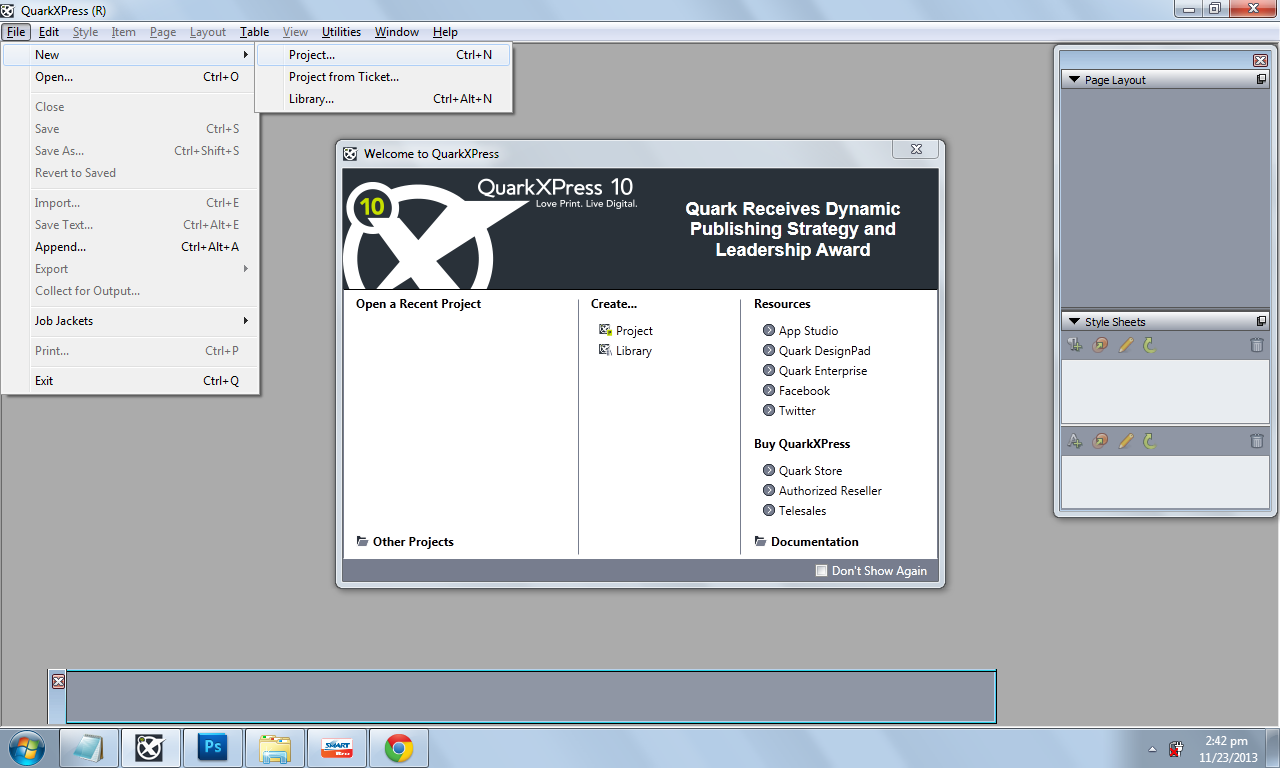
First open QuarkXpress of any version you are using. (mine version: QuarkXpress 10) You can download this on www.piratebay.com via uTorrent 3.3.1.


Select Project... or simply use Ctrl+N. (Click image to enlarge)


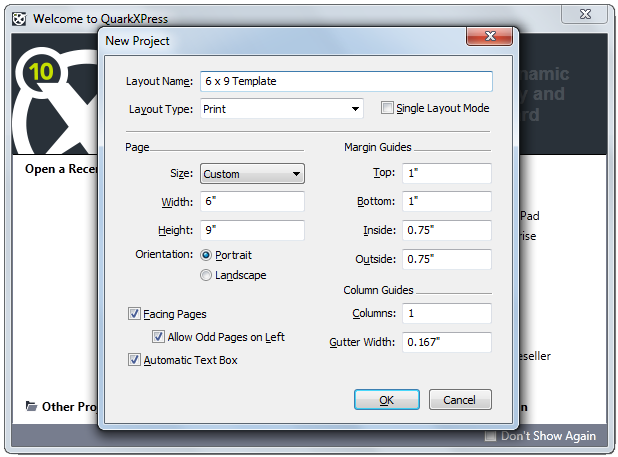
Fill in the layout name, sizes, margins, gutter and then OK. Always set the variables right most especially the width and  height. And since this template is for interior book design. Facing pages, Allow odd pages on left and automatic text box should be check. (Click image to enlarge)


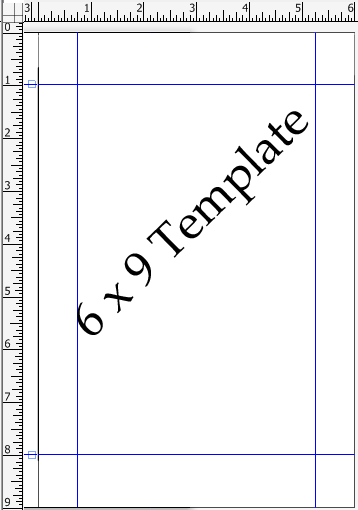
6 x 9 template
Sample of our created 6 x 9 template.
Now you can create any other book sizes just following the steps above.


How to Use Tangent Tangent Radius (TTR) Command in Autocad


How to Use Tangent Tangent Radius (TTR) Command in Autocad

In this lesson “How to Use Tangent Tangent Radius (TTR) Command in Autocad” the importance of command TTR will be shown. Here are the steps on how to use tangent tangent command in autocad. 


STEP 1
In Figure 1 I created two circles with a radius of 2cm each and the distance between these two circles is 8cm. What I want to perform is to place an arc connecting two circles with radius of 6cm. In command line type circle and there will be a message that you need to specify center point or select 2p/3p & TTR.

Figure 1
Figure 1


STEP 2
Choose TTR and type it in your command line then you will specify point on object for first tangent of circle and also point on object for second tangent of circle after doing this method you will need to input the specific radius which is 6cm in my example which is shown in Figure 2.

Figure 2
Figure 2


STEP 3
Repeat previous steps in making the circle above the two small circle as shown in Figure 3. (Note: the measurement is base on your drawing)

Figure 3
Figure 3

STEP 4
We need to trim down unnecessary lines by using trim command to attain the final drawing output. Here’s how to used trim:

Type trim in your command line, the autocad will ask you to select the object or select all to trim. Type all in your command line to select all drawings in autocad then enter; and click excess circles and line then enter again. The final output will look like Figure 4.

Figure 4
Figure 4


How to Write an Essay

WRITING AN ESSAY
  
Hi guys! Do you remember writing an essay with your professor during school years? Ooohhh... I’m sure yes! Have you done and explained the topic in details? Or you just leave your paper blank? I can still remember the time when taking up exams and at the last part was essay writing. I have no idea how to start or what to write down on my paper, and that made me feels know nothing. These are the reason why I’m imparting you some tips on how to write an essay.


In writing a good essay one must be prepare of the topic or theme to be given.

Predict test questions. Put yourself as you are the professor giving topic to give explanation. Ask what did the professor want to emphasize and want is the immense thought in that matter.

Practice writing. Write a summary of every information you’ve gathered; it should be understandable and explained every detail of collected ideas.

Arrange your ideas. Knowing your subject matter is only a piece of preparation. You have to expend a few time of how to organize your ideas or how will you make your coordinated.

I expect the next instance you are about to write an essay. Just remember this tips for a good output.

How to Analyze Series Circuits

CIRCUIT is the arrangement of components in electrical applications requiring the use of current.

Current in Series Circuit is the same amount at the same time in all the series components.
I = I1 = I2 = I3
I = VA  ÷ the total resistances in series. (I = VA / RT)

Resistance in Series Circuit
RT = R1 + R2 + R3+…+ etc.
RT = VA / I

Voltage in Series Circuit
VA = IR1 + IR2 + IR3
VA = V1 + V2 + V3 +… + etc
VA = IRT

Power in Series
PT = P1 + P2 + P3

Let’s have an example.

Solve for R3=?


Solve for R3 =?

Since I = I1 = I2 = I3
Therefore I = 3
RT = VA / I
=27V ÷ 3A
RT=9Ω

RT = R1 + R2 + R3
R3 = RT  – (R1 + R2)
R3 = 9Ω  – (2Ω + 3Ω)
R3 = 9Ω  – 5Ω
R3 = 4Ω - Final Answer

Checking Voltage Drops
V1 = IR1 = 3A x 2Ω = 6V  
V2 = IR2 = 3A x 3Ω = 9V
V3 = IR3 = 3A x 4Ω = 12V
VA = V1 + V2 + V3
VA = 6V + 9V + 12V
VA = 27V

Therefore, to Analyze Series Circuits:

First: When the current (I) for one component is known, use this for I in all components, as the current is the same in all parts of the series circuit.
Second: To calculate I, the total Voltage (VT) can be divided by the total Resistance (RT), or individual voltage drop can be divided by R.
Third: When the individual voltage drops around the circuit are known, these can be added up to equal to VT or VA.

Thank you for reading this post.

How to Easily Square Numbers Having 5 as the Last Digit

Now for this istudy technique for your studies, I am going to teach you how you can square (x2) any numbers that are having 5 as the last digit.

Even though squaring numbers won't take that long to solve, still it will take sometime to finish and it will also take some space on your scratch paper during your exam, quiz or just a normal on the spot test.

Did you ever think that you can easily square numbers having 5 as the last digit, e.g. 1025, 925, or even 25?

By the way what is the process of SQUARING A NUMBER first?
According to WIKIPEDIA "In mathematics, a square number or perfect square is an integer that is the square of an integer; in other words, it is the product of some integer with itself. For example, 9 is a square number, since it can be written as 3 × 3."
Now to start with this istudy technique, follow the very easy and simple steps below.

How to Easily Square Numbers Having 5 as the Last Digit

Example A : 
1. Let us begin with the simple number 25. We knew that squaring this number manually will lead to the computation below :

squaring number manually

2. Now to square 25 more easily and more faster follow the technique illustrated below.

STEP 1 : Immediately write 25 as the last two digit of your answer.
just write down 25 as the last two digits of your answer

STEP 2 : Now ADD 1 to the 2 of the number 25(multiplier). You will get 3, then multiply 3 with the 2 of the remaining number 25(multiplicand). That would be 3(2) which is 6.

add 1 to the 2 in the number 25 and multiply it to the 2 with the other number 25
STEP 3 : Get the answer obtained by multiplying 3 x 2 which is 6 and write it as the first digit of your answer which will be 625.

Therefore 25 x 25  = 625.

Example B : 
Note that you can also use this technique for numbers 15, 25, 35, 45, 55, 65, 75, 85 and 95. Now, try to square the number 95. Yes! the answer will be 9025, which is definitely lightning fast answer. How did we get it?

Here's how;

Like the first example just write down 25 as the last two digit of your answer. Then add 1 to 9 and multiply it with the other 9 getting the equation of (9+1) x 9 = 90. Write 90 as the first 2 digits for your answer. Therefor 90 and 25 will produced 9,025 which will be your answer.

Example C :
As you will noticed numbers like 15, 25, 35, 45, 55, 65, 75, 85, and 95 are all can be easily squared mentally. Would you agree? How about the numbers that are having three digits and 5 as the last digit like 125, 675, and so on.

The process is just the same. For example we wanna square the number 775. Immediately write down 25 as the last two digit of your answer. Then Add 1 to 77 getting 78 and multiply it by 77 which will be 6006. Therefore the answer will be 600, 625.

Even though multiplying 78 and 77 will also take sometime. It is still more faster way to get the square of 775.

I have made my personal approximation of SECONDS spend using the manual squaring of the number 775 and the technique.

MANUAL SQUARING - about 45 seconds
USING THE TECHNIQUE - about 15 seconds

There is 30 seconds difference between the two ways of getting the square of the number 775. In an exam which is under pressure for having a time limit using this technique would be very beneficial.

NOTE :

  • The same process goes with the four digit number.
  • This technique is only tested for numbers having 5 only as the last digit.

 
Design by Free WordPress Themes | Bloggerized by Lasantha - Premium Blogger Themes | Bluehost Review